
How to Fix Disapproved Ads
As the Editor-in-Chief of the Editorial Staff here at GlowStar Digital, I see how often advertisers run into Google Ads disapprovals without fully understanding why they happen or how to respond.
I created this guide for you to learn how to fix disapproved ads and manage Google Ads policy reviews.
You will learn how to:
- Identify why ads are disapproved
- Use Google Ads tools like the Policy Manager
- Make compliant ad updates
- Navigate the policy review and appeal process
Finding the Exact Problem
Fixing a disapproved ad starts with understanding the specific reason provided by Google.
Using Google’s Policy Manager
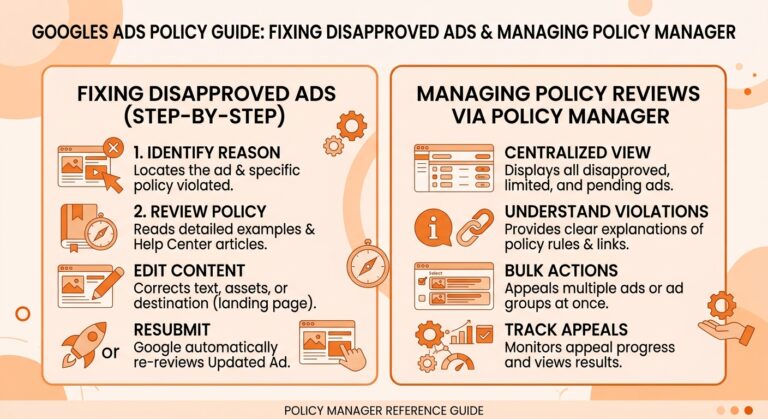
The Policy Manager inside Google Ads highlights:
- Which ad or asset is affected
- The policy category involved
- Whether the issue is editorial, technical, or content-based
This prevents guessing and helps focus only on what needs to change.
Analyzing Feedback and Error Messages
Error messages often reference landing page issues, disallowed content, or mismatched URLs. Reviewing these messages carefully is more effective than making broad edits.
Changing Your Ads
| Do This | Not This |
|---|---|
| Change only the flagged words or elements | Rewrite the entire ad |
| Match landing page content to ad intent | Build a new page unnecessarily |
| Follow the specific policy guidance provided | Guess or apply unrelated policy rules |
| Preserve approved assets and settings | Reset targeting or structure |
Once the issue is identified, updates should be minimal and policy focused.
Aligning With Policy Requirements
Advertisers should:
- Adjust ad copy to remove restricted language
- Ensure landing pages match ad intent and keywords
- Confirm final URLs and assets load correctly
Avoid overcorrecting. Small changes aligned with policy guidance are usually sufficient.
Enhancing Ad Content for Compliance
Clear descriptions, accurate targeting, and consistent messaging improve approval rates and long-term campaign stability.
How to Appeal Disapproved Ads
If an advertiser believes an ad complies with policy, an appeal can be submitted through Google Ads.
Step-by-Step Appeal Process
The appeal process typically includes:
- Selecting the disapproved ad
- Reviewing the cited policy
- Submitting the appeal for manual review
Appeals should be factual and concise.
Crafting a Convincing Appeal
Appeals work best when they reference:
- Specific policy language
- Clear explanations of compliance
- No assumptions or emotional language
Google makes final determinations, and outcomes vary.
What Else Can I Do?
When disapprovals persist, additional research can help identify patterns.
Researching Competitor Ads
Reviewing competitor ads in similar industries can provide insight into:
- Common approved language
- Landing page structures
- Ad formats that meet policy standards
This is for observation only, not copying.
Utilizing Industry Resources
Community forums, industry tools, and public discussions often highlight widespread issues, but official Google documentation should always take priority.
Google Ads Policies
To manage disapproved ads effectively, advertisers should rely on Google’s official advertising policies rather than assumptions or third-party interpretations.
Importance of Maintaining Quality Standards
Google Ads policies exist to protect users and maintain trust. Quality standards apply to:
- Ad copy language and claims
- Landing page content and transparency
- Website functionality and accessibility
Avoid unsupported claims like guaranteed results unless verified. Many policy violations are editorial, not punitive.
Understanding Google Ads Disapprovals
Disapproved ads occur when an ad, landing page, or account element does not meet Google Ads policies. The most important first step is recognizing that disapprovals are part of the normal review process within Google Ads.
Common Reasons for Disapproval
Most disapprovals fall into a few broad categories:
- Policy violations related to ad copy or content
- Destination mismatches between ad and landing page
- Technical errors such as broken pages or blocked content
Google reviews ads automatically and manually, so issues can appear even if ads previously ran.
Sustaining a Successful Google Ads Strategy
Long-term success depends on prevention, not constant fixes.
Regular Ad Monitoring Techniques
Routine checks help catch:
- Editorial changes
- Policy updates
- Technical website issues
This reduces campaign interruptions.
If you can, make sure you can review, correct, and manage disapproved ads while always deferring to Google Ads policies and official guidance.
Just know that Google Ads policies evolve. Ongoing review of policy updates, account alerts, and review statuses supports consistent compliance over time.
Google Ads disapprovals are best handled by understanding policies, using Google’s built-in tools, and making precise, compliant updates. Advertisers should always rely on Google Ads as the authority on policy interpretation and review decisions.

Subscribe