
Structuring Google Ads Setup
As the Editor-in-Chief of the Editorial Staff here at GlowStar Digital, I currently manage academic analysis on how small-businesses are approaching structuring Google Ads setup with account and billing for long term performance and financial control.
I’ve created this guide for you to answer that exact question clearly and directly. In the sections that follow, you will learn how to:
- Create one Google Ads account and set the correct country, currency, and time zone.
- Set up billing with a valid payment method and confirm invoices or auto pay settings.
- Organize campaigns by service, product, or goal, then split into clear ad groups.
- Set budgets and access permissions early to avoid billing or control issues later.
Setting Up Your Google Ads Account
The first step is creating a Google Ads account using a Google login associated with the business owner or primary administrator.
When creating the account, you must select:
- Your country
- Your currency
- Your time zone
These settings cannot be changed later. Choosing the wrong currency or time zone can cause reporting issues and billing confusion, especially for businesses operating across regions.
After account creation, access permissions should be configured immediately. Admin access should be limited to trusted users. Standard or read only access can be assigned to team members or agencies as needed. For businesses managing multiple accounts, using a manager account allows centralized control.
Navigating the Google Ads interface takes time, but understanding it early is essential. Key areas include Campaigns, Ads and Assets, Keywords, Audiences, Tools and Settings, Billing, and Reports. Learning where to find budgets, conversion tracking, and billing details saves time during optimization.
Account level settings such as conversion tracking, auto tagging, and account preferences should be reviewed before launching campaigns. These settings influence how performance data is recorded and reported across the entire account.
Account Hierarchy and Campaign Structure
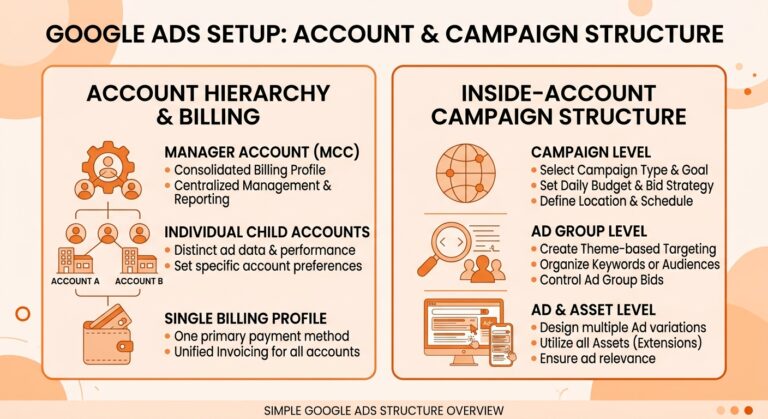
Account hierarchy means organizing campaigns and ad groups in a logical, scalable way. A well structured account mirrors how the business operates.
Campaigns should be organized by goal, service, product category, or geographic area. For example, a home services company may separate campaigns by service type such as roofing, plumbing, and electrical. An ecommerce brand may separate campaigns by product category or brand.
Ad groups (under a campaign) should be tightly focused. Each ad group should contain closely related keywords and ads that match the same user intent. This improves ad relevance, click through rate, and Quality Score.
Selecting and structuring keywords properly is critical. Use keyword research tools like Google Keyword Planner to identify search intent for each “Ad”. Apply appropriate match types such as exact, phrase, or broad. Negative keywords should be added early to prevent wasted spend on irrelevant searches.
Campaign structure best practices include limiting too many goals within a single campaign, keeping budgets aligned with priority, and avoiding over consolidation that reduces control. A clear hierarchy improves reporting clarity and allows faster performance adjustments.
Creating Campaign Goals and Targeting Strategies
Every Google Ads campaign should have a single primary goal. Common goals include lead generation, sales, website traffic, or brand awareness. Mixing goals within one campaign makes optimization difficult and performance unclear.
Developing clear campaign goals ensures bidding strategies and measurement align with business outcomes. A lead generation campaign should optimize for conversions, not clicks. An ecommerce campaign should optimize for purchase value, not traffic volume.
Targeting and scheduling ads correctly improves efficiency. Location targeting should match service areas or shipping regions. Device targeting allows adjustments for mobile, desktop, or tablet performance differences. Ad scheduling ensures ads run during high conversion periods.
Audience targeting adds another layer of control. Custom audiences, remarketing lists, and Customer Match allow advertisers to reach users based on behavior and intent. Combining keyword targeting with audience signals improves relevance and conversion rates.
Utilizing effective ad extensions such as sitelinks, callouts, structured snippets, and call extensions increases ad visibility and click through rate. Extensions also improve Quality Score by increasing relevance and user engagement.
Quality Scores for Better Performance
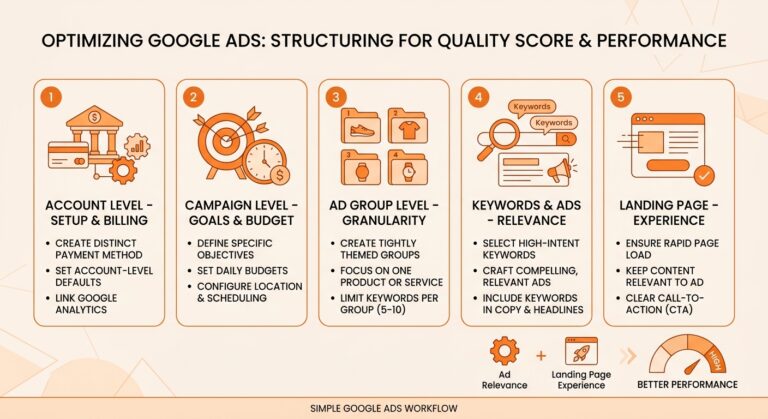
Quality Score is a important factor in Google Ads performance. It directly impacts cost per click, ad position, and impression share.
It’s influenced by three primary factors:
- Expected click through rate
- Ad relevance
- Landing page experience
Ad relevance improves when keywords, ad copy, and landing page content match user intent closely. This is achieved through tight ad group structure and clear messaging.
Landing page experience plays a major role. Pages should load quickly, be mobile friendly, and provide clear value related to the ad. Poor landing pages reduce conversion rates and increase costs.
Strategies for Quality Score improvement include rewriting ads to match keywords, removing low relevance keywords, improving page speed, and testing different messaging. Small improvements in Quality Score can lead to significant cost savings over time.
Setting Up Billing in Google Ads
Creating new billing setups involves selecting a payment method such as credit card, debit card, or bank transfer.
Some accounts may qualify for monthly invoicing based on spend history and business verification.
Integrating existing billing information is important for businesses managing multiple accounts. Manager accounts can use consolidated billing to centralize payments and reporting across clients or brands.
Managing payments includes setting payment thresholds, auto pay preferences, and invoice delivery options. Billing alerts should be enabled to notify users of payment issues or balance changes.
Common payment issues include declined cards, exceeded credit limits, incorrect billing addresses, and currency mismatches. These issues can pause ads automatically if not resolved quickly.
Monitoring billing history regularly helps catch discrepancies early. Reviewing charges ensures spend aligns with budgets and campaign performance.
Setting up billing in Google Ads should be done carefully to avoid payment interruptions or account suspensions. Billing is managed at the account level and affects all campaigns.
Maximizing ROI with Google Ads Through Monitoring and Optimization
Tracking and analyzing performance should focus on conversions, cost per conversion, and return on ad spend.
We want to stress that impressions alone do not indicate success.
Conversion tracking must be properly configured to measure real business actions such as form submissions, calls, or purchases. Without accurate tracking, optimization decisions are guesswork.
Adjusting budgets for better returns involves shifting spend toward high performing campaigns and reducing waste in low performing areas. Budget changes should be data driven, not emotional.
Bid strategies should evolve as data accumulates. Manual bidding may work early, while smart bidding strategies like Maximize Conversions or Target CPA perform better once enough data exists.
Regular account audits ensure structure, billing, and performance remain aligned with business goals. Accounts that are reviewed consistently outperform those that are left unchanged.
Maximizing ROI with Google Ads requires continuous monitoring and adjustment. Setup alone does not guarantee success.
Understanding Google Ads Basics
A Google Ads account is built in layers. At the top is the account itself, which controls billing, access, currency, and time zone. Inside the account are campaigns, which define goals, budgets, locations, and campaign types. Within campaigns are ad groups, which contain keywords, ads, and targeting logic.
Every decision made at the account level affects everything below it. Poor structure creates reporting confusion, wasted budget, and limited optimization control. Clean structure makes performance analysis easier and improves long term scalability.
Google Ads success is not driven only by ad copy or bidding strategies. It starts with correct account setup, clear hierarchy, and proper billing configuration. When these foundations are strong, optimization becomes simpler and more effective.
Google Ads is a pay per click advertising platform that allows businesses to show ads across Google Search, YouTube, Display Network, and other Google owned properties. Before structuring an account, it is critical to understand how Google Ads works at a foundational level.
Structuring Google Ads setup with account and billing done correctly creates a strong foundation for long term success. Clean hierarchy, clear goals, proper billing, and monitoring turn Google Ads into a predictable growth channel.
When accounts are structured with intention, performance data becomes clear, costs decrease, and scaling becomes easier. Businesses that invest time in setup and billing accuracy consistently outperform those that rush the process.

Subscribe