
How to Measure Google Ads Goals
As the Editor-in-Chief of the Editorial Staff here at GlowStar Digital, I’ve seen firsthand how often businesses struggle with measuring what truly matters inside Google Ads. I created this guide to show how to measure Google Ads goals for maximum performance and ROI:
- Set one clear goal like calls, leads, or sales.
- Install conversion tracking with Google Tag Manager.
- Watch conversions, CPA, and CTR.
- Review weekly and adjust based on results.
I created this guide to show you how to define, track, analyze, and refine your Google Ads goals so every dollar you invest works harder, produces measurable results, and drives real business growth.
Making Clear Goals and Matching Them to Your Business
This all begins with identifying the single most important action that drives revenue inside your business. A vague objective like getting more traffic does not provide meaningful direction. A clear objective like generating qualified leads under a specific cost gives you a measurable performance standard.
Matching goals to the business’s needs ensures that your tracking setup reflects how your business actually makes money. A roofing company may prioritize booked inspections. A medical clinic may focus on appointment requests. An ecommerce brand may define success as completed purchases above a certain order value.
Goals should also be layered through the funnel. Top funnel goals include guide downloads and newsletter subscriptions. Mid funnel goals include quote requests and demo bookings. Bottom funnel goals include direct purchases and signed contracts. Tracking every stage gives you visibility into how users progress toward conversion.
As businesses grow, their priorities evolve. Early stage companies seek volume. Growth stage companies focus on efficiency. Established brands reach for profitability and lifetime value. Revisiting objectives regularly ensures your Google Ads strategy stays aligned with your long term business goals.
Setting Up Your Google Ads Campaign
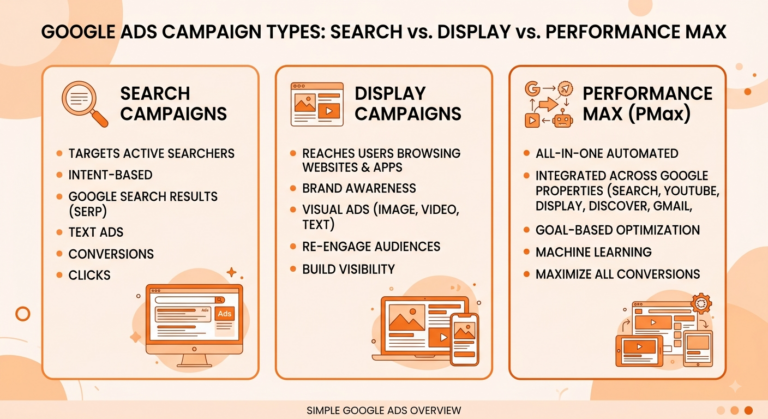
Setting up your Google Ads campaign correctly determines how accurately your goals can be measured later. Campaign structure influences how clearly data can be analyzed and optimized.
Creating a new campaign starts by selecting the correct objective inside Google Ads. Options include sales, leads, website traffic, product promotion, brand awareness, and app promotion. This selection influences how Google delivers traffic and optimizes bidding.
Choosing the right campaign type is equally important. Search campaigns capture high intent users actively looking for your service. Display campaigns increase awareness and support retargeting. Performance Max campaigns combine multiple networks using machine learning driven optimization. Shopping campaigns drive ecommerce sales.
Each campaign type tracks performance differently. Search focuses on direct conversions. Display emphasizes assisted conversions. Performance Max relies heavily on conversion volume and value. Choosing the wrong campaign type can distort how performance is measured.
Proper account structure also includes clean keyword segmentation, geographic targeting, device adjustments, and tightly themed ad groups. Organized accounts are easier to scale and easier to diagnose when performance shifts.
Google Tools for Tracking
Install Conversion Tracking with Google Tag Manager
- Open your GTM container
- Create a trigger for the conversion action
- Create a tag (Google Ads or Analytics)
- Connect the tag to the trigger
- Test in Preview mode
- Publish your container
Utilizing Google Tools ensures your measurement framework remains clean and reliable.
Enhanced eCommerce tracking allows online stores to track product views, add to carts, checkout steps, and completed purchases. This reveals where users abandon the funnel and which products actually generate profit. It also enables more accurate return on ad spend reporting.
Implementing Google Tag Manager simplifies all tracking across your website. It allows you to deploy Google Ads conversion tags, Analytics events, and third party scripts without needing constant developer updates.
With Tag Manager, you can track form submissions, call clicks, button interactions, scroll depth, video engagement, and downloads. These micro conversions reveal intent signals long before a final conversion happens.
Google Analytics adds another layer by measuring user engagement, session duration, bounce rates, and behavioral flow. When Analytics and Google Ads are linked, advertisers gain a full picture of what happens after the click.
Key Google Ads Metrics to Track
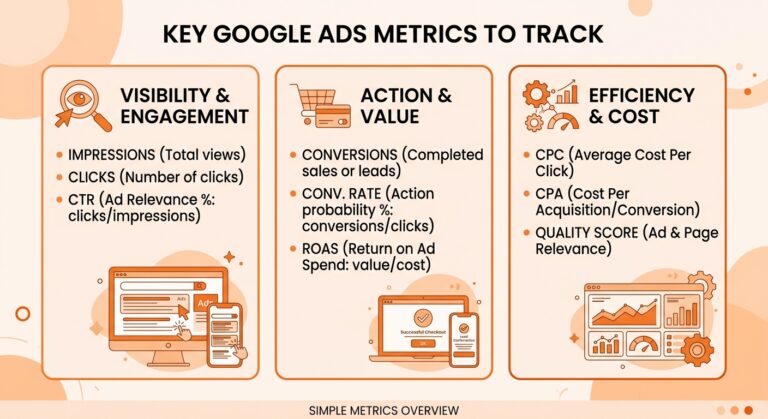
Focusing on these metrics allows advertisers to evaluate performance objectively and make informed decisions.
Click-Through Rate (CTR) measures how often users click your ads after seeing them. A low CTR often signals irrelevant targeting or weak ad messaging. A strong CTR usually indicates your message matches user intent.
Cost Per Acquisition (CPA) measures how much you pay for each conversion. CPA is one of the most important profitability metrics. A campaign may generate many leads but still lose money if CPA exceeds what the business can afford.
Understanding Quality Score is essential for controlling costs. Quality Score is influenced by expected CTR, ad relevance, and landing page experience. Higher Quality Scores lead to lower cost per click and better ad placement.
Other important performance metrics include conversion rate, impression share, average cost per click, and return on ad spend. These metrics should always be reviewed together for proper context.
Implementing Conversion Tracking
This is the foundation of accurate goal measurement. Without it, campaigns operate without meaningful feedback.
Setting Up Conversion Tracking Essentials begins by defining which user action qualifies as a conversion. This may be a purchase, phone call, appointment booking, form submission, or app install. Each action requires a specific tracking method.
Website conversions rely on page view triggers or event based triggers. Call conversions use Google forwarding numbers with duration filters. App conversions rely on Firebase integration. Offline conversions require CRM data imports. Each method must be implemented correctly to avoid false reporting.
Using Conversion Data to inform strategy allows advertisers to identify exactly which campaigns, keywords, ads, and audiences produce the most valuable actions. Budget can then be shifted toward the strongest performers while poor segments are reduced or paused.
Whenever possible, conversion values should be assigned. This allows Google to optimize based on revenue instead of volume alone, which is essential for ecommerce brands and high ticket service businesses.
Using Smart Bidding Techniques
Leveraging smart bidding techniques allows Google to automatically optimize bids using machine learning and conversion data.
Smart bidding is driven by real time decision making. These systems analyze thousands of signals including device, location, audience behavior, time of day, and past conversion patterns. Bids are adjusted dynamically to maximize the likelihood of conversion.
Setting bidding strategies for success depends on your business stage. Maximize Conversions is ideal for early data collection. Target CPA works well when stable cost control is needed. Target ROAS is best for revenue driven ecommerce campaigns.
Smart bidding relies completely on clean conversion tracking. Inaccurate data leads to poor automation results. When tracking is precise, smart bidding often outperforms manual bidding in both performance and scalability.
Whenever a bidding strategy is activated or changed, a learning period of at least two to three weeks should be allowed. During this phase, performance fluctuations are normal as the algorithm adapts.
Testing Goals Regularly
Evaluating and testing your goals regularly ensures your campaigns remain aligned with market behavior and business priorities.
Techniques for effective evaluation include weekly performance analysis, search term audits, keyword performance reviews, conversion tracking verification, and profitability reporting. These checks prevent waste from compounding over time.
Segmenting conversions by device, location, hour of day, and audience often reveals hidden performance patterns. Removing inefficiencies at the segment level can dramatically improve overall results.
The importance of ongoing testing lies in continuous optimization. Testing ad copy, landing pages, audience layers, and bidding strategies allows steady performance improvement month over month.
Testing must be controlled and documented. Only one primary variable should be changed at a time. This ensures results can be accurately attributed and refined.
Goals for Better ROI and Measuring Success
Refining your objectives for better ROI separates average advertisers from scalable growth brands.
Steps in refining goals include eliminating low quality conversions, reassigning conversion values, tightening geographic targeting, reallocating budgets, improving landing page experience, and strengthening follow up systems.
For service businesses, refinement often means prioritizing booked appointments rather than simple contact forms. For ecommerce brands, it means optimizing for order value rather than purchase volume. For startups, it often means shifting from traffic growth toward profitability.
Measuring success and adjusting strategy completes the optimization loop. True success is measured by profit, not clicks, impressions, or traffic alone. Every campaign must consistently answer one question. Did it generate more revenue than it cost?
When performance declines, immediate action must follow. This may include campaign restructuring, bid adjustments, creative refreshes, or conversion path improvements. Businesses that act quickly always outperform those that wait.
Goal-Setting in Google Ads
Understanding the importance of goal-setting in Google Ads ties every tracking and optimization system together. Without clearly defined goals, even the best technology cannot drive consistent results.
Why setting Goals is crucial for success comes down to structure, direction, and accountability. Goals define what success actually looks like inside your account and tell Google exactly what actions to prioritize.
Some types of goals in Google Ads include lead form submissions, phone calls, online purchases, appointment bookings, app installs, and store visits. Each plays a different role depending on your business model.
Aligning goals with business objectives ensures your advertising performance directly supports revenue growth. When goals mirror revenue drivers, optimization becomes predictable, repeatable, and scalable.
Measuring Google Ads Goals
Measuring Google Ads goals correctly is not a one time setup. It is an ongoing process of defining objectives, building proper tracking, analyzing real performance data, leveraging automation, testing continuously, and refining strategy for sustained growth.
When done correctly, Google Ads becomes one of the most predictable and scalable customer acquisition systems available. When done poorly, it becomes an expensive guessing game driven by incomplete data and unclear objectives.
Clear goals create clear growth. With disciplined tracking, smart optimization, and ongoing refinement, every advertising dollar becomes an intentional investment rather than a blind expense. The businesses that win long term are the ones that measure accurately, adapt quickly, and optimize relentlessly.

Subscribe